I benchmarked open-source object removal until it actually worked
· creative-stack · ai-video, comfyui, object-removal, benchmarking, failure
I kept telling people my creative stack “wasn’t sure if it was client-grade yet.” That’s a useless thing to say. So I stopped guessing and measured it — and the measuring taught me more than the result did.
The job: remove a person from real footage using Netflix’s open-source VOID inpainting, running locally on one RTX 5090. No cloud, no per-frame API bill. Here’s how four runs went, honestly.
Run 1: it works, but there’s a ghost
First clip — a dim laboratory scene, a scientist standing behind a rack of glassware. I masked “person,” ran VOID, and 149 seconds later got back a clip with the scientist gone and the blackboard behind him plausibly reconstructed.
Except for one stretch around the half-second mark, where he crouched behind a beaker. There, a soft blue smear of him stayed behind. A ghost.
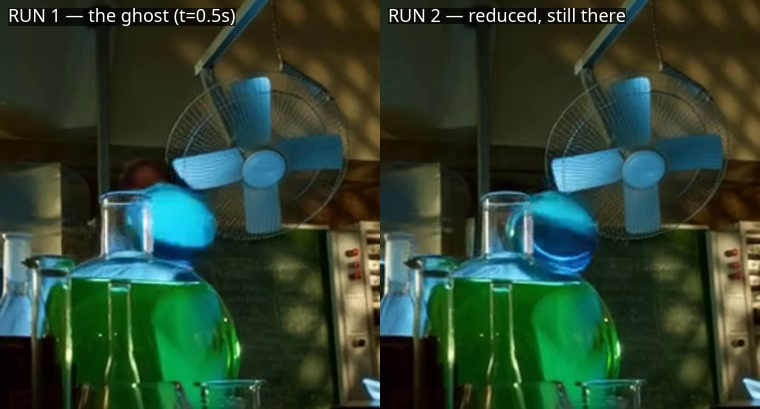
I could have written “object removal: works.” That would have been a lie of omission. The honest entry was: works mid-clip, leaves a ghost on occlusion, output is half-resolution and truncated. Three specific, fixable problems — which is a far more useful thing to know than a thumbs-up.
Run 2: fixing the easy two, naming the hard one
Two of those were quick. The truncation was a frame cap set to 5 seconds; I lifted it. The reconstruction quality was hurt by a fill prompt that — embarrassingly — still said “empty sidewalk daylight,” a leftover from some unrelated test. In a laboratory. I fixed it to describe the actual scene. (Lesson filed: always read the actual parameter values, not the ones you assume are there.)
The ghost was the hard one, and I could finally name its cause. The workflow used SAM3 in image mode — it segments one frame and reuses that mask. When the subject is occluded in some frames, the mask drops, and VOID has nothing to fill against. The cure is SAM3’s video mode: segment once, then propagate the mask through every frame, tracking the subject through occlusions. It’s the exact same fix I’d already made elsewhere in the stack months ago — I just hadn’t carried it into this workflow.
The ghost shrank but didn’t vanish. Progress, not victory.
Run 3: the dependency rabbit-hole
Here’s where it got real. To use SAM3 video mode I had to wire in four new nodes — and they weren’t loading at all. Neither were several others.
The error was a missing Python module, comfy_env. I traced it: the node pack listed comfy-env==0.3.89 in its requirements, but that requirements file had never been installed. The image-mode SAM3 node came from the same pack and loaded fine, which is exactly why this stayed invisible — half the pack worked, so nothing looked broken. One pip install, a restart, and all four video nodes appeared.
Then I grafted them into the workflow by editing its API graph directly — replacing the single-frame segmenter with the four-node video chain and rewiring the mask output — and it validated with zero errors on the first submit. The infrastructure was finally correct. Masks now propagated through the whole clip.
And the ghost was reduced but still not gone.
This is the moment most benchmark write-ups quietly stop. I almost did. But the result was nagging at me, because the fix was demonstrably correct and the artifact persisted. Which meant the artifact wasn’t about the fix.
Run 4: the clip was the problem all along
That lab clip is a near-impossible test. The subject is behind transparent glassware, in very low light, partially occluded. No inpainter — local or cloud — handles that cleanly, because there’s barely any background signal to reconstruct from. I had been benchmarking my tool on its worst possible input and concluding the tool was weak.
So I ran it once more, on a representative clip: a well-lit kitchen, a spoon pouring sauce into a pan — a cleanly separable object in good light, the kind of footage a real removal job actually looks like. Same pipeline. Same settings.
180 seconds. Spoon gone. No ghost. No smear. The steel equipment and counter behind it reconstructed perfectly. Client-deliverable.
Same tool. Same code. The only variable that changed was the clip — and it flipped the verdict from “not ready” to “ready.”
The actual lesson
A single failure frame proves nothing. Test selection is the evaluation. If you judge an AI tool on its worst-case input, you’ll under-rate it; on its best-case, you’ll over-sell it. The honest move is to do both, separately, and say which is which: clean on representative footage; struggles on low-light occluded subjects. That sentence is worth more than any single number, because it tells a client exactly when to trust it.
And the boring meta-lesson, the one that actually cost me the most time: a dependency that’s listed but never installed will fail silently and partially, and you’ll waste an afternoon blaming your logic before you check your environment.
Every run, every failure, and the exact numbers are public — empty cells and all — in the benchmark tables. That’s the whole point: the failures are the documentation.
This is part of a fully local, sovereign AI creative stack on one RTX 5090. The build — including every workflow’s measured capability and what’s still unmeasured — is at github.com/MushiSenpai/mushishi-creative-stack.